Posts

Showing posts with the label windows 7

How to play Anno 1404 multiplayer in local area network
Image
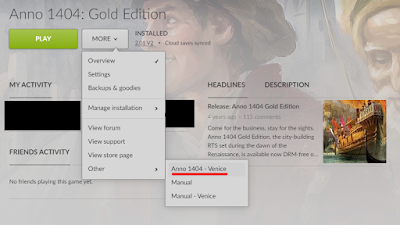
Not long ago, I bought Anno 1404 Gold Edition on discount from gog.com for about 4€. I have enjoyed playing it in local LAN. But getting there was a bit tricky, and here is a guide for others who want to do the same. 1) You need the Venice expansion pack for Anno 1404. The base game doesn't have a multiplayer feature. The Gold Edition contains both Anno 1404 and the Venice expansion. 2) You only need to buy one copy of Anno 1404 and Venice expansion to play in the local area network. 3) Starting the game, you should make sure to start Anno 1404 Venice, and not Anno 1404. There is no multiplayer option to select in Anno 1404. Here's a screenshot of how to start Anno 1404 Venice via GOG Galaxy: Don't press the big green button! You can also open start menu and type "Venice" to find the shortcut to Anno 1404 Venice. 4) You should create the game session on the most powerful PC you have. This is also the computer you should save the game on. We'l...
How to scan with an old HP ScanJet on a Windows 10 machine

Image
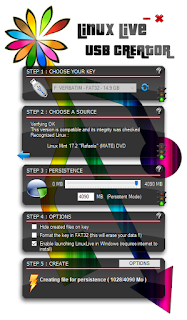
I think it's a sin that HP doesn't support their old scanners on newer Windows machines. This way they end up in landfills and HP can make money selling new ones. I'm running Windows 10 and was unable to use the old HP ScanJet 6300 I have, since there is no TWAIN driver available for it. So I googled around and found a program called VueScan, which implements their own driver for old scanners. It was nice, but the trial version leaves a nasty big watermark. And the cost is crazy. 40€ for simple scanning and 90€ for OCR? A new scanner is cheaper! If a VueScan developer is reading this, I would have gladly paid 5€ for your program, with OCR. I hope you consider re-thinking your prices. So here is a guide how you too can keep your old Scanner working without VueScan. The answer is called Linux, specifically a Live USB stick. It takes about 10-20min to create the stick. You just need an USB thumb drive with some 8 GB of free space. 4 GB should probably work too. 1) Down...

How to fix Sublime Text 3 "open with..." error

When trying to set explorer to open .txt files with Sublime Text 3, I couldn't select Sublime Text at all. After browsing for the sublime_text.exe, the list of programs still didn't show Sublime Text as an option. It seems that Sublime Text 2 had left the registry in a broken state. The solution for this is to install CCleaner and running the registry cleanup, TWICE. After that, reinstall Sublime Text 3 . Then right-click on a .txt file (or whatever file type you want to open with ST3) and select Open with... - Choose default program... - Browse... and find sublime_text.exe. Now you can select Sublime Text.

The Fall crash solved

Image
The Fall is the best adventure game I've played for years. It's a very innovative scifi-themed game with a really dark plot and great atmosphere. But I was having a big problem: the game crashes every time after a certain scene where the main character is being hacked into. You are supposed to press the ESC key at that point, but pressing it causes a crash and a return to desktop. This happens at least with my setup, Windows 7 32-bit, and the Steam version of the game. Fortunately, there is a solution: 1) right-click on The Fall in your Steam library and select Properties 2) press on the "Set launch options..." button 3) Type in this text:  -force-d3d9 After that I had no problems at all. The reason for the crash seems to be in the new DirectX version. The above launch option forces the game to use the older DirectX 9. Have fun with one of the best adventure games around!

Using windows shell script and adb to backup stuff from your Android phone

Here's some tips on how to write a shell script to backup stuff from your Android phone to a Windows machine. This should work on any version of Windows, but I've only tested it on Windows 7 and Windows 10. First, you need the Android SDK installed. The command line tools are enough, you don't need the full Android Studio. You will be using the adb.exe found within to do the transfers and removing of files on the phone. Second, you need an ADB (Android Debug Bridge) driver for your phone installed. Most phone manufacturers provide ADB drivers on their websites. Note: Seems that the ADB bridge is nowadays supported in Windows 10 and recent mobile phones without any extra drivers. I haven't had to install ADB drivers at all recently. Third, your Android phone needs to be in developer access mode . You should do a couple modifications to the script below. These include setting the ADB path variable and setting the destination folders for sound recordings and images...

How to put Firefox in Kiosk mode with no scroll bars

Here's how to make Firefox run in kiosk mode. Just install the add-on R-Kiosk . From now on, Firefox will run in fullscreen with most of the user interface disabled. If you want to also disable the scroll bars, you have to create a userContent.css file. 1) go to your Profile folder . In Windows 7, it is a subfolder of "%APPDATA%\Mozilla\" with a random name. 2) if a subfolder "chrome" doesn't exist in your profile folder, create the subfolder 3) if the userContent.css file doesn't exist, create it with notepad 4) add this line to the userContent.css file: html { overflow: -moz-scrollbars-none; }

Installing Labtec webcams for Windows 7

PROTIP: Just install the "Windows XP and Windows Vista" driver! At least it worked great for my Labtec Webcam 2200 and with Windows 7 32-bit. The drivers can be downloaded from: http://www.labtec.com/ Make sure you get the webcam model right!

Where does uTorrent keep its .torrent files?

NOTE: uTorrent cannot be trusted anymore. It is known to install Yandex, Ask Toolbar, a bitcoin miner and displayed ads among other fishy stuff. Don't use uTorrent! I recommend using qBittorrent instead, which is an open-source alternative. If you deleted uTorrent and want to remove all of its files, you might want to know where it stores them. On Windows 7, uTorrent stores .torrent files by default in: C:\Users\%USERNAME%\AppData\Roaming\uTorrent ...where %USERNAME% is your Win7 username, and assuming your Windows 7 installation is on C: drive. If you can't browse to this directory, write it on the address bar of Explorer. Another way is to show hidden files by going to Win7 control panel's "folder options" - then you can see the AppData folder.

Installing Worms Armageddon on Windows 7

Here's how: 1) Put the CD in your CD Tray 2) Download and run this installer Be sure not to use spaces in the directory name. For me, the installer didn't install the patch and the update . Download them and install first the newest patch, then the update. I recommend getting the newest beta version. Worms Armageddon is still being updated to this day, which is quite incredible...