Posts

Showing posts with the label instructable

Minimizing a linux virtual disk image with zerofree

How to make your linux drive image smaller with zerofree and virtualbox-manage First you need to write zeroes on top of old unallocated data (the files you have deleted) on the virtual drive. This is done with zerofree. zerofree will only overwrite unallocated data so the Virtualbox drive image file will not get any bigger than it already is. Then we use vboxmanage to compact the virtual disk image. Note that this will not work if you are using an encrypted hard disk. This is because the zeroes written by zerofree will be encrypted. In that case, the virtual disk image will grow to it's full size. 1. Install zerofree First, install zerofree on your virtual machine: sudo apt install zerofree 2. Log in to recovery mode Log in to your machine in recovery mode. At startup, press shift to see GRUB menu. Select Advanced options and recovery mode for the newest kernel. Then select Root from the menu. Press enter when it asks you to "Press enter for maintenance". 3. Remount the d...

Stop the CxUiUSvc service from eating your RAM

Many people seem to have a problem on their PC where a process called CxUiUSvc is eating all the RAM memory. This is caused by a faulty audio driver that seems to be totally useless. The problem seems to appear on HP and Lenovo laptops among others. A driver update might help you, but that is unlikely, since Conexant has stopped operations and will no longer provide updates. The fix to the problem is to stop the CxUiUSvc service and disable it in Windows Services. Stopping the service has seemingly no effect your audio will continue working normally.  Some sites and people recommend setting the service to start manually. This however is reported to cause the service to start again automatically after a few days. Setting the service to disabled should stop it from starting again by itself. Here is a good tutorial on how to disable services. Use the instructions in the tutorial to change the startup type of the CxUiUSvc service to disabled. Some sources: HP forums discussing this iss...

How to find the ScummVM game folder on Android

Image
Finding stuff on the Android ScummVM app is not the most intuitive process, but it pays out! Finding the game folder on Android ScummVM is not very straightforward, so I decided to write this quick guide. I already wrote a guide on how to install and play Curse of Monkey Island on Android , but didn't elaborate on how to find the game folder on the app. Firstly, ScummVM is an awesome open-source collection of game engines capable of running many old point & click classics . In addition to the first three Monkey Island games, you can play Blade Runner, Broken Sword, Day of the Tentacle, Elvira, Full Throttle, Gabriel Knight, Grim Fandango, Indiana Jones, King's Quest, Kyrandia, Lands of Lore, Leisure Suit Larry, Longest Journey, Loom, Myst, Police Quest, Quest for Glory, Sam & Max, Simon the Sorcerer, Space Quest, The Dig, Ultima, Waxworks... the list goes on and on! So, you have transferred the game folder of your game on your phone using USB file transfer or by copyin...

How to install and play Curse of Monkey Island on Android

Image
There are some great adventure games on Android already. I can warmly recommend Thimbleweed Park or The Silent Age for example. But what if you wanted to play an old classic that cannot be found on Google Play? ScummVM is an app that can emulate these games, if you have the data files. And Curse of Monkey Island is one of these classics. Installation Purchase Curse of Monkey Island from gog.com or Steam (costs about 5€) Download and install it with the GOG Galaxy launcher ... Or Steam Locate the Curse of Monkey Island install directory on your PC Copy the directory to your Android phone, either with a USB cable or on the SD card with an adapter Install the ScummVM app on your phone Start ScummVM and press "Add game" Find the game folder on your phone, select it and click OK.  If you have trouble finding the folder, I made a separate guide for that. Now you can start enjoying Curse of Monkey Island! These instructions should also work on an iPhone. Controls The game is or...

Changing motherboard and processor while keeping the same Windows 10 installation

Here's an account of changing the motherboard and processor to your PC while keeping your Windows 10 installation intact. My old mobo finally died on me, and I had to get a replacement. The processor I had on it was a second-gen Intel Core i7. I opted for an AM4 motherboard with a AMD Ryzen 5 series processor. While waiting for the parts to arrive, I wondered if I needed to install Windows 10 again from scratch.  Turns out, I didn't.  As my hard drives were fine, I just installed the new parts, put my old hard drives in, and turned the machine on. Windows started to a blue screen, with repair options available. "It seems you are having trouble starting Windows" or something like that. I thought I would need to remove the old Intel processor driver, and do stuff like that, until it works. So I went and booted it to safe mode ( here's a guide on how to do that ). And voila, I got to login to my PC just like it was before.  So I started thinking, if the safe mode wor...

How to install yle-dl on OSMC Linux

Yle Areena is a really great free streaming site run by the Finnish goverment funded media house Yleisradio . It has a Netflix-like browser interface. I am using a Home Theater PC (HTPC) called Vero 4K to watch content. It is running the OSMC Linux distro with Kodi as the interface. However, this guide should work on anything running OSMC, for example a Raspberry Pi . Lately, Yle changed their API, making the yle-areena Kodi plugin obsolete. After that I have been using yle-dl by Antti Ajanki to download and watch movies. It's a bit of a hassle to use. Compared to just using the Areena plugin, you have to first download the content on the command line and then find it on Kodi and play it. But it works well enough. Keep in mind, this is all legal according to Finnish law. Yle Areena is a legal streaming site and you can make recordings for your own use. So, here's how to get yle-dl running on OSMC.  Connect to the OSMC device with an SSH terminal program like PuTTY . Updat...

Guide: Play Starbound coop in local network with one license

Image
  There are some instructions all around the internet on how to play Starbound co-op multiplayer with your friends, but most of them are needlessly convoluted. Many of them ask you to run a Starbound server. But you don't actually need to run anything else than the game itself. This guide applies to two people, but others can join as well. The players should all be connected to the same home network via wifi or an ethernet cable. I got my version of Starbound from the gog.com store. But this guide should work with all versions of the game on Windows 10. Find the local IP address of the player who hosts the game Let's say the 1st player is the one who is hosting the game. They need to check their local IPv4 IP address. That is where the game is running.  You can find out your local IP by pressing the windows key, typing "cmd" in the search, and then by typing "ipconfig". From there, find you IPv4 address. The printout will look something like this: Wireless ...

Fixed: Problems starting Ken Follett's The Pillars Of The Earth

Image
  At the moment, you can get Ken Follett's The Pillars Of The Earth (and two other games - Deponia: The Complete Journey and The First Tree) for free on epicgames.com. I highly recommend doing as I did and getting them with a couple of clicks! But when launching the game, I was greeted with an error. There seems to be some bug with the Epic games version. I think the problem is caused by the space in my Epic games username. The error message reads: Init failed, could not load game. There is no game file or the game file is corrupted. For more info view messages.log. When clicking OK, the messages.log file opens, with text like this: 19:04:09.352:m_gamePath: C:\Games\PillarsoftheEarth\NAME" 19:04:09.352:Loading game from file 'NAME"' failed! 19:04:09.352:Init failed, could not load game The message would look like that if your username is "USER NAME". But don't worry. You can still launch the game. Go to the folder where the game is installed (in my c...

Exporting to a CMYK color profile with GIMP on Windows 10

Recently I had to export some image for CMYK printing. The print house was requesting a certain FOGRA color profile. I don't have any Adobe licenses and am doing all the image work on GIMP, so I had to do a bit of research. Googling around, I found two options to export images. A plugin called "Separate" and another plugin called Cyan . It looked like Separate is not maintained anymore , so Cyan was my choice. Here's how to do it: Download Cyan, Run Cyan once and select some profiles as "default" profiles. I'm a bit unsure why you need to do this, but this is how it works for some reason. Restart GIMP and you should see the Cyan drop down in the file menu. From there, you can select to export any file you've opened with GIMP. Close Cyan and browse to this location with Windows File Explorer: C:\Users\<YOUR USERNAME>\.config\Cyan\icc Copy any .icc color profile files you want to use to that folder. Now you can select those new profiles the next...

How to remove extra items from the 'new' context menu in Windows 10

If you haven't cleaned it up yourself, chances are there are several useless and annoying items in the right-click "New" context menu. People rarely create Rich Text Documents for example. And I never create new LibreOffice document files with the right-click menu. Instead, I open LibreOffice and then do what I need. So here's how to get rid of some of these extra options in your Windows 10 right-click context menu. Remove New 'Avisynth Script' option The file extension is avs. With regedit, go to: Computer\HKEY_CLASSES_ROOT\.avs Delete the ShellNew folder. Remove New 'Rich Text Document' The file extension is rtf. Remove folder Computer\HKEY_CLASSES_ROOT\.rtf\ShellNew Remove New 'Bitmap image' The file extension is bmp. Remove folder Computer\HKEY_CLASSES_ROOT\.bmp\ShellNew Remove New 'OpenDocument Text' The file extension is odt. Remove folder: Computer\HKEY_CLASSES_ROOT\.odt\LibreOffice.WriterDocument.1\ShellNew Remove New 'OpenD...

Using the backup-manager Linux utility

Here's a quick rundown of a simple backup-manager configuration. In addition to the basic tarballs, I set it up to backup the mysql database. I did not automate the backup process. I will use the configuration to backup stuff manually on a USB drive. I am also not using the upload functionality of backup-manager. These should be relatively easy to set up once you try out the manual process. Installation Installing backup-manager with apt-get is easy: sudo apt-get update sudo apt-get install backup-manager It will ask for some of the configuration. Don't worry about that now, we will change the configuration later. Disable unnecessary cron job (optional) With the following commands I found all the backup-manager files strewn across the system: updatedb locate backup-manager From there, I could see that backup-manager installed a cron job: /etc/cron.monthly/backup-manager-clean-upload-db As I am not using the upload jobs, I disabled that cron job. This should not be necessary. su...

Format a disk on Ubuntu command line

Make sure you have cfdisk installed: sudo apt-get update sudo apt-get install cfdisk Please note: this will erase your disk! Also note: your old data will be still readable after this. The data is not totally destroyed! If you want to make sure the data is destroyed, you have to shred the disk. Connect your drive if it is not connected. See the dmesg command to see which device it was attached to: dmesg This will show you for example messages about "sdd" Then use cfdisk to partition your disk: sudo cfdisk /dev/sdd Use the simple cfdisk interface to: Delete the old partition Make a new partition with type 83 "Linux" Write the partition table Quit After that, you need to create a file system on the disk. sudo mkfs.ext4 /dev/sdd1 This would create partition 1 on the disk /dev/sdd.

A simple iptables config example

Here's my super simple iptables config file. It will accept SSH, HTTP and ping (ICMP) from anyone. Other inward connections will be dropped. Outward connections or connections from the local host are not restricted in any way. *filter :INPUT DROP [0:0] :FORWARD ACCEPT [0:0] :OUTPUT ACCEPT [0:0] -A INPUT -p tcp -m tcp --dport 80 -j ACCEPT -A INPUT -p tcp -m tcp --dport 22 -j ACCEPT -A INPUT -p icmp -j ACCEPT -A INPUT -i lo -j ACCEPT -A INPUT -m state --state RELATED,ESTABLISHED -j ACCEPT -A OUTPUT -j ACCEPT COMMIT In order to have the config automatically load during boot, I recommend the package iptables-persistent. On Ubuntu or Debian you should be able to install iptables-persistent with the command sudo apt-get install iptables-persistent Now you can save your configuration to the persistent iptable rule file /etc/iptables/rules.v4 and load it with the command sudo iptables-restore < /etc/iptables/rules.v4 Note that if you are using fail2ban, you should stop the fail2ban serv...

Silencing lm-sensors alarms

This guide might help you configure your lm-sensors. This example is made using an Intel DH61AG motherboard. After installing lm-sensors on my Ubuntu machine, I had some strange readings and alarms in the sensors output: coretemp-isa-0000 Adapter: ISA adapter Physical id 0:  +37.0°C  (high = +82.0°C, crit = +102.0°C) Core 0:         +30.0°C  (high = +82.0°C, crit = +102.0°C) Core 1:         +31.0°C  (high = +82.0°C, crit = +102.0°C) nct6775-isa-0290 Adapter: ISA adapter Vcore:          +0.74 V  (min =  +0.00 V, max =  +1.74 V) in1:            +1.09 V  (min =  +0.00 V, max =  +0.00 V)  ALARM AVCC:           +3.34 V  (min =  +2.98 V, max =  +3.63 V) +3.3V:      ...

Full list of keyboard shortcuts for Windows Terminal

I already wrote a post about tips on using the new Windows Terminal app . Going further, here is the current full list of keyboard shortcuts for this great tool. These are the defaults when you install the app. All of these shortcuts can be changed in your personal settings file. This list can be found in the default settings file in the official Github repository . Check that out if you want the most up to date info. I was originally looking for a "select all" function, but sadly that has not been implemented. But it seems they are working on it . Here is the full list: // Application-level Keys { "command": "closeWindow", "keys": "alt+f4" }, { "command": "toggleFullscreen", "keys": "alt+enter" }, { "command": "toggleFullscreen", "keys": "f11" }, { "command": "openNewTabDropdown", "keys": "ctrl+shift+space" }, { ...

How to fix the Anno 1404 out of memory error

While playing Anno 1404 Venice multiplayer in local LAN , I had some crashes on one of the PCs. The game suddenly shows a message saying "You no longer have enough memory" and then crashes after a while. I found several tips on the internet on how to solve this. But for me, this is what worked: 1) Download this tool called 4GB Patch and run it on these four .exe files: \Anno 1404 Gold Edition\Addon.exe \Anno 1404 Gold Edition\Anno4.exe \Anno 1404 Gold Edition\tools\AddonWeb.exe \Anno 1404 Gold Edition\tools\Anno4Web.exe 2) Reduce graphics quality to medium or low. This allowed us to play long sessions and I never saw the error again. I don't mind the graphics being a bit crappy if works better. If you're looking for help on how to play Anno 1404 in the local network, check this guide !

How to play Anno 1404 multiplayer in local area network

Image
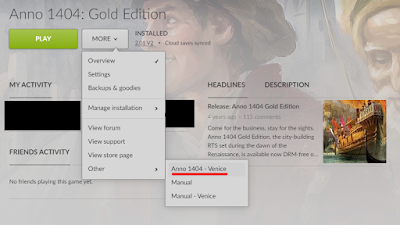
Not long ago, I bought Anno 1404 Gold Edition on discount from gog.com for about 4€. I have enjoyed playing it in local LAN. But getting there was a bit tricky, and here is a guide for others who want to do the same. 1) You need the Venice expansion pack for Anno 1404. The base game doesn't have a multiplayer feature. The Gold Edition contains both Anno 1404 and the Venice expansion. 2) You only need to buy one copy of Anno 1404 and Venice expansion to play in the local area network. 3) Starting the game, you should make sure to start Anno 1404 Venice, and not Anno 1404. There is no multiplayer option to select in Anno 1404. Here's a screenshot of how to start Anno 1404 Venice via GOG Galaxy: Don't press the big green button! You can also open start menu and type "Venice" to find the shortcut to Anno 1404 Venice. 4) You should create the game session on the most powerful PC you have. This is also the computer you should save the game on. We'l...

Removing unnecessary software from a new Windows 10 install

Here's a list of programs I recommend removing from a clean Windows 10 install. Click on start menu, Settings, Apps, and from the list, select what you want and Uninstall. What you should remove depends on what you need. There are also better programs out there to replace some of these. Commonly unnecessary software to remove: 3D Builder 3D Viewer Feedback Hub Groove Music Mixed Reality Portal Mobile Plans Movies & TV OneDrive OneNote Print 3D Xbox Live Xbox Console Companion A clean install of Windows 10 will have shortcuts for the various Microsoft Office apps, such as Access, Excel, PowerPoint, Publisher, Outlook and Word. But if you don't have an Office license and are not planning on getting one, these are just taking up space. And you can always get the LibreOffice suite for free. In order to remove them, remove also the following programs: Office Microsoft Office 365 - da-dk Microsoft Office 365 - en-us ...and all of the other Office 365 ...

Change the default directory of Git Bash in Windows

Image
By default, Git Bash on Windows will open in your user folder. In order to change this to another folder, you need edit two things in the Git Bash shortcut: 1. Remove the --cd-to-home from Target field. 2. Change "Start In" field to be the path to your desired startup folder. If you want to edit the shortcut in your start menu, select "Open file location": And then right-click the Git Bash shortcut in the folder that opens, and select Properties.