Posts

Showing posts with the label games

How to fix Fortnite "driver has known issues" warning message

I was trying Fortnite on a laptop but got the following error: The installed version of the Intel graphics driver has known issues. Please install the latest driver version. Would you like to visit the following URL to download the driver? https://downloadcenter.intel.com/product/80939/Graphics Intel(R) UHD Graphics Installed: 30.0.101.1122 Minimum required: 30.0.101.1404 First, I tried to update the driver through Device Manager with Windows Update. To try this, right-click your graphics adapter in Device Manager and select Update. But there was no newer update available. I then tried to update my drivers with the software Intel Support Assistant. But after updating the drivers, I still got the error message! Then I checked my laptop model and googled what graphics adapter it has. I went through that original link again, selected the graphics card type by hand and downloaded the newest driver, and now finally the error message is gone. So there you have i...

How to find the ScummVM game folder on Android

Image
Finding stuff on the Android ScummVM app is not the most intuitive process, but it pays out! Finding the game folder on Android ScummVM is not very straightforward, so I decided to write this quick guide. I already wrote a guide on how to install and play Curse of Monkey Island on Android , but didn't elaborate on how to find the game folder on the app. Firstly, ScummVM is an awesome open-source collection of game engines capable of running many old point & click classics . In addition to the first three Monkey Island games, you can play Blade Runner, Broken Sword, Day of the Tentacle, Elvira, Full Throttle, Gabriel Knight, Grim Fandango, Indiana Jones, King's Quest, Kyrandia, Lands of Lore, Leisure Suit Larry, Longest Journey, Loom, Myst, Police Quest, Quest for Glory, Sam & Max, Simon the Sorcerer, Space Quest, The Dig, Ultima, Waxworks... the list goes on and on! So, you have transferred the game folder of your game on your phone using USB file transfer or by copyin...

How to install and play Curse of Monkey Island on Android

Image
There are some great adventure games on Android already. I can warmly recommend Thimbleweed Park or The Silent Age for example. But what if you wanted to play an old classic that cannot be found on Google Play? ScummVM is an app that can emulate these games, if you have the data files. And Curse of Monkey Island is one of these classics. Installation Purchase Curse of Monkey Island from gog.com or Steam (costs about 5€) Download and install it with the GOG Galaxy launcher ... Or Steam Locate the Curse of Monkey Island install directory on your PC Copy the directory to your Android phone, either with a USB cable or on the SD card with an adapter Install the ScummVM app on your phone Start ScummVM and press "Add game" Find the game folder on your phone, select it and click OK.  If you have trouble finding the folder, I made a separate guide for that. Now you can start enjoying Curse of Monkey Island! These instructions should also work on an iPhone. Controls The game is or...

Some Spelunky 2 seeds

Image
  Here's some seeds I've found for Spelunky 2, and a couple others that I found from Steam. The problem when finding seeds online is that some of them have changed and are no longer working. At the moment these work, and they should continue to do so for a while. If you don't know how to enable seeds in Spelunky 2, you should continue playing! You will get there eventually. Seeds I've found so far: ABADABAD : 1-2 jetpack & telepack, 1-1 is nice & easy CACAFEED : 1-2 quite easy kapala, super fast 1-1 ABBACACA : 1-2 mystery box + altar, altar needs bomb, also power pack in shop CACCAB00 : 1-2 mystery box + altar 715517EE : 1-3 easy(?) kapala A15ADADA : 1-3 shop has 3x bomb box And here's a couple working seeds I found from Steam discussions. 222d7b75 (Tall Jade Vortex): Jetpack, mattock, and bomb box in 1-2 shop, perfect for practicing no-teleporter speedruns. There are even more bombs and paste on 1-3, if you can manage to steal them from the shop. ABCDEF00 (...

Guide: Play Starbound coop in local network with one license

Image
  There are some instructions all around the internet on how to play Starbound co-op multiplayer with your friends, but most of them are needlessly convoluted. Many of them ask you to run a Starbound server. But you don't actually need to run anything else than the game itself. This guide applies to two people, but others can join as well. The players should all be connected to the same home network via wifi or an ethernet cable. I got my version of Starbound from the gog.com store. But this guide should work with all versions of the game on Windows 10. Find the local IP address of the player who hosts the game Let's say the 1st player is the one who is hosting the game. They need to check their local IPv4 IP address. That is where the game is running.  You can find out your local IP by pressing the windows key, typing "cmd" in the search, and then by typing "ipconfig". From there, find you IPv4 address. The printout will look something like this: Wireless ...

Fixed: Problems starting Ken Follett's The Pillars Of The Earth

Image
  At the moment, you can get Ken Follett's The Pillars Of The Earth (and two other games - Deponia: The Complete Journey and The First Tree) for free on epicgames.com. I highly recommend doing as I did and getting them with a couple of clicks! But when launching the game, I was greeted with an error. There seems to be some bug with the Epic games version. I think the problem is caused by the space in my Epic games username. The error message reads: Init failed, could not load game. There is no game file or the game file is corrupted. For more info view messages.log. When clicking OK, the messages.log file opens, with text like this: 19:04:09.352:m_gamePath: C:\Games\PillarsoftheEarth\NAME" 19:04:09.352:Loading game from file 'NAME"' failed! 19:04:09.352:Init failed, could not load game The message would look like that if your username is "USER NAME". But don't worry. You can still launch the game. Go to the folder where the game is installed (in my c...

How to fix the weird audio bug in Kingdom Come: Deliverance

Image
  Kingdom Come: Deliverance has a bug which makes the sound come out muffled or like the characters were talking far away or through a tunnel. This seems to be because the game thinks you are using multichannel surround sound. There seems to be no option to change the audio mode in-game. Instead, you should change your audio settings in Windows by following these directions: Press the windows key Type "Choose your output device" and select the search result. Select "Device properties" under the Output caption. Select "Additional device properties" This dialog will differ depending on your audio hardware. Go to the Advanced tab. There should be a selection for the default audio format. You should select something like this: 2 channel 44100 Hz audio. I had my Focusrite audio interface set up with 8 channels 24bit 44100 Hz, and that caused Kingdom Come to think I have surround sound. After changing the channel amount to 2 the audio started working correctly.

How to fix the Anno 1404 out of memory error

While playing Anno 1404 Venice multiplayer in local LAN , I had some crashes on one of the PCs. The game suddenly shows a message saying "You no longer have enough memory" and then crashes after a while. I found several tips on the internet on how to solve this. But for me, this is what worked: 1) Download this tool called 4GB Patch and run it on these four .exe files: \Anno 1404 Gold Edition\Addon.exe \Anno 1404 Gold Edition\Anno4.exe \Anno 1404 Gold Edition\tools\AddonWeb.exe \Anno 1404 Gold Edition\tools\Anno4Web.exe 2) Reduce graphics quality to medium or low. This allowed us to play long sessions and I never saw the error again. I don't mind the graphics being a bit crappy if works better. If you're looking for help on how to play Anno 1404 in the local network, check this guide !

How to play Anno 1404 multiplayer in local area network

Image
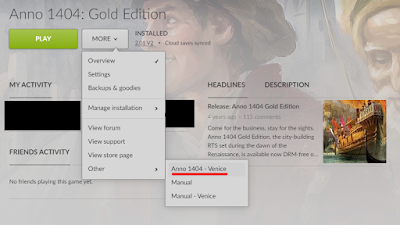
Not long ago, I bought Anno 1404 Gold Edition on discount from gog.com for about 4€. I have enjoyed playing it in local LAN. But getting there was a bit tricky, and here is a guide for others who want to do the same. 1) You need the Venice expansion pack for Anno 1404. The base game doesn't have a multiplayer feature. The Gold Edition contains both Anno 1404 and the Venice expansion. 2) You only need to buy one copy of Anno 1404 and Venice expansion to play in the local area network. 3) Starting the game, you should make sure to start Anno 1404 Venice, and not Anno 1404. There is no multiplayer option to select in Anno 1404. Here's a screenshot of how to start Anno 1404 Venice via GOG Galaxy: Don't press the big green button! You can also open start menu and type "Venice" to find the shortcut to Anno 1404 Venice. 4) You should create the game session on the most powerful PC you have. This is also the computer you should save the game on. We'l...

The Fall crash solved

Image
The Fall is the best adventure game I've played for years. It's a very innovative scifi-themed game with a really dark plot and great atmosphere. But I was having a big problem: the game crashes every time after a certain scene where the main character is being hacked into. You are supposed to press the ESC key at that point, but pressing it causes a crash and a return to desktop. This happens at least with my setup, Windows 7 32-bit, and the Steam version of the game. Fortunately, there is a solution: 1) right-click on The Fall in your Steam library and select Properties 2) press on the "Set launch options..." button 3) Type in this text:  -force-d3d9 After that I had no problems at all. The reason for the crash seems to be in the new DirectX version. The above launch option forces the game to use the older DirectX 9. Have fun with one of the best adventure games around!

Installing Worms Armageddon on Windows 7

Here's how: 1) Put the CD in your CD Tray 2) Download and run this installer Be sure not to use spaces in the directory name. For me, the installer didn't install the patch and the update . Download them and install first the newest patch, then the update. I recommend getting the newest beta version. Worms Armageddon is still being updated to this day, which is quite incredible...

Running Black Dahlia on modern PCs

I just played through the old PC adventure game Black Dahlia. It's a good game, well worth a look if you like adventure games. It's a full-motion video (FMV) based game spanning 8 CDs, with some OK acting and an entertaining (but confusing and sometimes illogical) plot. The game was made in 1998 for Windows 95/98 and it's not that trivial to get it to work flawlessly. Here's how to do it. If you are running a Windows version above Windows XP If you are using any of these: Windows Vista Windows 7 Windows 8 Windows 10 Windows 11 ...you most probably can't make the game work without a virtual machine. But still I recommend you to try it yourself, using the below game installation guide. Installing Win95 / 98 on a virtual PC 1) Install Oracle VM Virtualbox and create a virtual PC 2) Install Windows 95 or 98 on the virtual PC Get hold of a copy of Windows 95 or 98. Maybe the easiest to install is the Windows 95 floppy disk version. Here's a guide to help you with ...

Minecraft recv failed error... fixed!

Image
OK. A lot of people seem to have this problem. Finally, I managed to fix it for myself! This problem is quite common with Minecraft Survival Multiplayer. Basically, the problem goes like this: you connect to a server, maybe manage to do something for some minutes, and then you eventually hang up with the message: Internal exception: java.netSocketException: Software caused connection abort: recv failed For some, this comes instantly. Some fall straight into the void and cannot communicate through the chat, although they see the others talk. Some even get to mine something for a while. But then it all ends with this message. It seems that this problem is due to two things: certain integrated network adapters and their old / buggy drivers, and the current buggy state of Minecraft multiplayer mode. Also, some people report that the problem may occur due to incorrect port forwarding. With me, this was not the case. Solutions that work for some people (but didn't work...